Cursor

mode

Language Support

logo

Get in touch

Awesome Image Awesome Image

Latest News December 12, 2022

HOW TO USE INSTAGRAM ANALYTICS

Writen by savy

comments 0

There is no doubt that in today’s marketing world Instagram is growing as a way for brands to connect with customers. So how do we know if your Instagram marketing strategy is working? That’s where analytics comes in.
  • How to Setup Instagram Analytics?
First of all, you need a Business or Creator account to view analytics which is done by selecting ‘Settings’ followed by ‘Account’. Then all you need to do is select ‘Switch to Professional Account’.
  • How to use Instagram Analytics?
As with any channel, it’s important to get clear insights to drive performance and growth on Instagram. Let’s look at what metrics you can use to do that.
  • Follower Growth
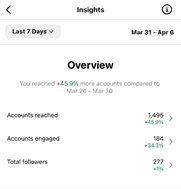
It shows your follower count and can link a spike or dip to a particular campaign or timeframe. So, if you see a big jump in followers, look at what content was posted during that time.
  • Engagement Rate
This will help you evaluate the performance of your account. Engagement rate by followers – likes + followers/number of followers x 100 Engagement rate by reach – likes + comments/reach x 100
  • Feed & Stories Posts
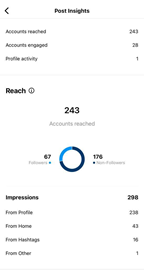
When you tap on individual Instagram posts, it is not only likes, comments and saves but also,
  • Interactions – This shows profile visits and website clicks
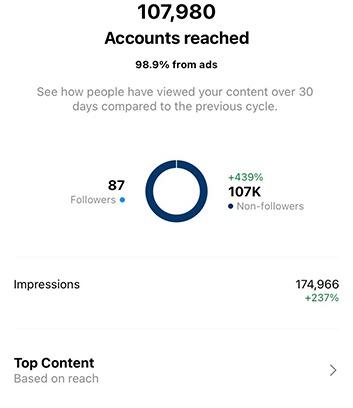
  • Reach – You can look at accounts reached and follows
  • Impressions – This shows impressions from hashtags, home, profile, and others
These metrics will enable you to see what people are clicking on. For example, are there people in images that perform well, or is it simply the product? These will help you create better and more effective posts that drive people to visit your site or purchase.

Leave A Comment

//